OBD Auto Doctor car scanner
Creosys LtdAuto & Vehicles
4.2906.00 Reviews
- Version
- Varies With Device
- Installs
- 1.00M
- Age Rating
- Everyone
Screenshots
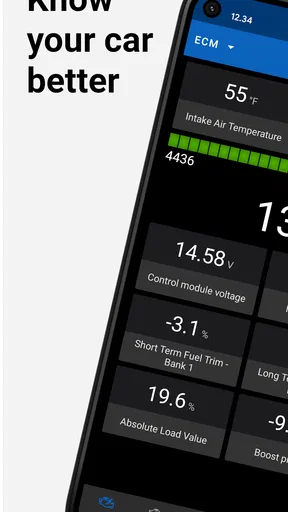
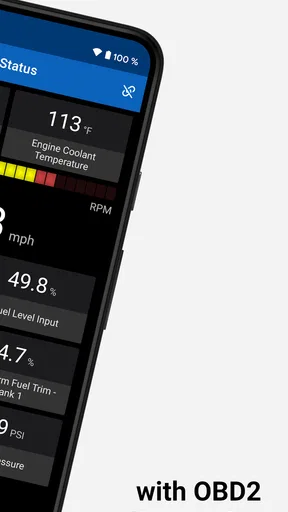
Our Review of OBD Auto Doctor car scanner
 Analysis by Appyee
I judge an OBD scanner by whether it helps me make a better next decision, not by how many numbers it can put on a screen. OBD Auto Doctor is most useful as a first look at a car’s diagnostic information: it can help me understand why a warning light is on, check readiness before an emissions test, and decide whether a problem deserves prompt attention. It is a practical companion for an adapter, but it is not a substitute for a mechanic or a guarantee that a car is safe to drive.
That distinction matters. A code reader can make vehicle information less mysterious, yet a code points to a system or condition rather than automatically naming the failed part. I like this app best when I treat its results as a starting point for a sensible conversation with a repair shop, not as a do-it-yourself diagnosis that settles everything.
How it fits into everyday car ownership
I find this app most useful when it turns a vague dashboard warning into a better-informed next step, rather than tempting me to diagnose the car from one code. In this section, I’d focus on practical habits that make its readings more useful—especially when to check them and what to note—before looking at the situations where a different scanner or professional help makes more sense.
A useful first check, not a remote repair shop
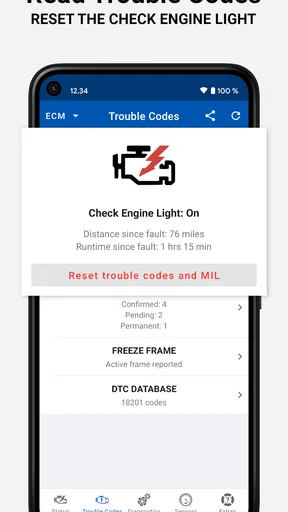
When the check engine light appears, I want to know what the car has recorded before deciding whether to book a visit. The app’s diagnostic trouble-code reading gives me that first clue, and its descriptions can help translate an unfamiliar code into something I can discuss. If the warning comes with severe symptoms, though, such as rough running or an obvious loss of power, I would not let an app’s explanation reassure me into carrying on regardless. A code is context, not a safety verdict.
Clearing a code is similarly best used with care. It can turn off the warning, but that does not repair the underlying issue; the light may return if the condition remains. I would record the code and any symptoms before clearing anything, then use the information to check whether a repair has actually addressed the cause. That simple sequence avoids losing a useful clue just to make the dashboard look tidy.
The adapter is part of the experience
Getting started requires an OBD-II adapter, so the app alone cannot communicate with a car. That is an important practical detail if you are comparing it with a stand-alone handheld scanner: the phone app gives you a familiar screen, while the adapter is an extra piece to choose, connect, and keep available. Connection behavior can also depend on that hardware, so a failed link does not automatically mean the app or car is at fault.
If the connection stalls, I would check the adapter is seated properly, confirm the car is in the state needed for communication, and reconnect before assuming there is a deeper fault. The original experience includes occasional connection hiccups, and restarting the app may help. I would avoid fiddling with a phone while driving; check data while parked, or have a passenger handle it.
OBD Auto Doctor is made by Creosys Ltd and sits in the auto-and-vehicles category. It has been around since July 31, 2012, and its average is 4.2 from around 26,000 ratings, with roughly 886 written reviews and more than 1 million installs. It is free to install, rated for Everyone, and offers in-app purchases ranging from $4.49 to $84.99 per item. Those figures suggest it has found a broad audience, but they do not remove the need to check whether your adapter and vehicle work well together.
What the live information is good for
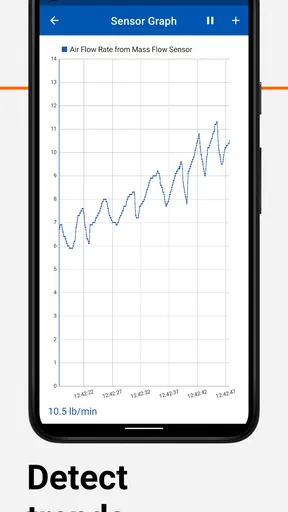
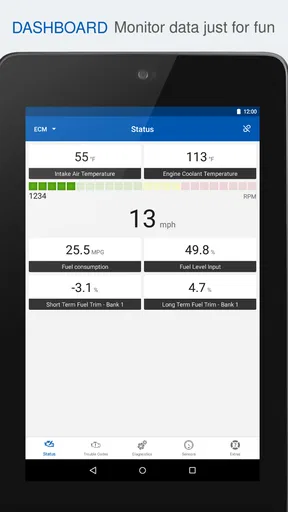
Live readings such as RPM and speed are engaging, but their real value is comparison over time or under similar conditions. I would use them to observe how the engine behaves during a normal trip, rather than treating one glance at a changing number as a diagnosis. If something feels unusual, a record of what was happening when it occurred can make a later discussion with a technician more concrete.
Fuel-economy information is also more useful as a pattern than as a verdict on a single journey. Traffic, route, load, and driving style can all affect consumption, so I would compare like with like before deciding that a change in the app reflects a mechanical problem. For someone trying to smooth out acceleration or understand how daily habits affect fuel use, that feedback can be a helpful nudge; it cannot promise a particular saving.
Readiness checks can save a wasted trip
The emissions-readiness view is one of the most practical reasons to keep a scanner handy. Before heading to a test, I would check whether the vehicle’s monitors are ready rather than discovering at the testing centre that another drive cycle is needed. If the car has recently had its codes cleared or its battery disconnected, readiness information deserves extra attention: clearing codes can also reset the checks that need to run again. The app can help me see the status, while the car still needs suitable driving conditions and time to complete those checks.
This is a case where the app can prevent inconvenience without pretending to control the outcome. A ready status is useful preparation, not a promise that the vehicle will pass every part of an emissions inspection. I would still address any warning lights and follow the testing rules where I live.
Where it sits beside other scanner choices
Compared with a basic handheld code reader, a phone-based setup can feel more approachable if I already want to keep diagnostic information on a screen I know. The app’s mix of code reading, live data, readiness, and fuel-economy information gives me several reasons to open it beyond one emergency. A handheld unit may be the better choice for someone who wants a dedicated tool without depending on a phone, app, or wireless connection.
At the other end, professional diagnostic equipment and a mechanic’s inspection can go further when a fault is intermittent, vehicle-specific, or tied to systems that a general OBD-II tool does not cover. I would not expect a consumer scanner to replace that depth. The sensible middle ground is to use this app for basic awareness and preparation, then seek expert testing when symptoms, safety, or an unclear result call for it.
Who will get the most from it
I would recommend it to drivers who are comfortable pairing a phone with an adapter and want more context than a warning light alone provides. It makes particular sense for someone who maintains an older car, checks readiness before an emissions appointment, or wants to arrive at a garage able to describe a code and the circumstances around it. Car enthusiasts may also enjoy watching live readings, provided they resist drawing big conclusions from isolated values.
It is less suitable if you want a guaranteed diagnosis, a repair guide that handles every fault, or a tool that works without separate hardware. It may also frustrate someone who expects every advanced option to be free, since some features sit behind in-app purchases. If you only need a code read once and dislike troubleshooting a phone-to-adapter connection, borrowing a scanner or asking a shop to check the car may be the simpler route.
A realistic way I would use it
Imagine the check engine light comes on during a routine week, but the car still seems to drive normally. Once parked, I would connect the adapter, read and note the code, and take stock of any recent changes or symptoms. I would use the app’s explanation to frame the issue, not order parts based on the first result. If the code points to something that needs attention, I would arrange a proper assessment; if the car feels unsafe, I would stop driving and seek help rather than waiting for more app data.
For an upcoming emissions test, I would use a different workflow: check readiness ahead of the appointment, especially after recent maintenance or a cleared warning, and avoid clearing codes simply to hide a light. For a fuel-use question, I would compare similar trips and driving conditions instead of judging the app on one commute. These small choices make the readings more useful and reduce the chance of mistaking a convenient number for a complete answer.
My verdict
When I first opened OBD Auto Doctor, I was impressed by its clean and intuitive interface. Designed to be user-friendly, even for folks not particularly tech-savvy, the app guides you through the setup process with ease. It’s compatible with both Android and iOS, which is a big plus for someone who switches between devices. There’s something quite satisfying about seeing your car’s data pop up on your phone screen, almost like you’ve unlocked some hidden treasure chest of information.
Getting Started
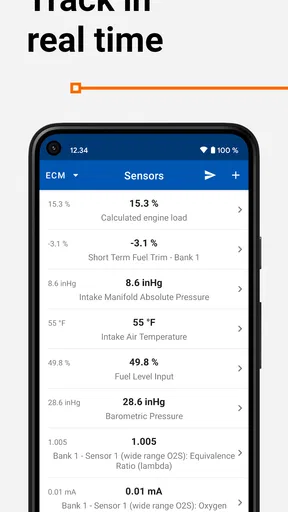
Setting up the app is straightforward. You’ll need an OBD-II adapter to connect your phone to your car. Once connected, the app quickly starts communicating with your vehicle. The real-time data feature is especially cool; watching your car’s RPMs and speed change as you drive is oddly mesmerizing. It’s like having a mini mechanic in your pocket.
Features That Stand Out
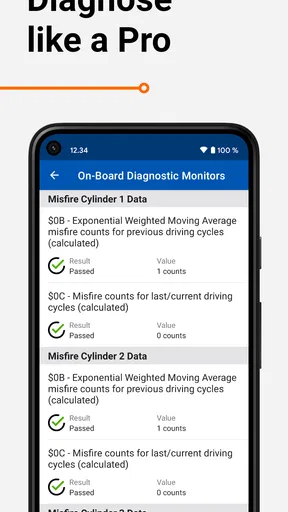
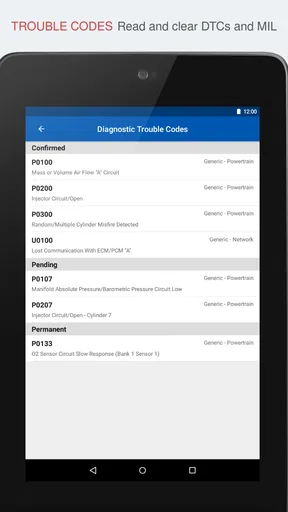
One of the standout features is the ability to read and clear diagnostic trouble codes (DTCs). No more guessing why that check engine light is on. The app provides detailed information about each code, helping you decide whether it’s something minor or if a trip to the mechanic is in order.
Another feature I found incredibly useful is the emissions readiness status. For anyone needing to pass an emissions test, this is a lifesaver. The app tells you if your car is ready for testing, potentially saving you a wasted trip.
And let’s not forget about the fuel economy feature. With rising fuel costs, it’s helpful to understand your car’s fuel consumption patterns. The app provides insights into your driving habits and tips on how to improve efficiency. It’s like having a personal driving coach!
What Could Be Improved
No app is perfect, and OBD Auto Doctor is no exception. While the free version offers a decent range of features, some advanced options are locked behind a paywall. It’s understandable, but if you’re on a budget, it might be something to consider.
Occasionally, the app’s connection to the OBD-II adapter can be a bit finicky. A few times, I had to restart the app to re-establish a connection. It’s a minor inconvenience, but one worth mentioning.
Who Is This App For?
Whether you’re a car enthusiast wanting to dive deeper into your vehicle’s performance or just someone looking to dodge unnecessary trips to the mechanic, this app is a solid choice. It’s also fantastic for anyone looking to improve their driving efficiency and save on fuel costs.
The app caters to both seasoned gearheads and novices alike, providing just enough technical detail without being overwhelming. It’s a tool that grows with your knowledge, making it a worthwhile investment.
Final Thoughts
All in all, OBD Auto Doctor is a handy app that brings a wealth of car data right to your fingertips. It’s a great blend of functionality and user-friendliness, making it a must-have for anyone wanting to take control of their vehicle’s health. While there are a few areas for improvement, the app’s benefits far outweigh the minor drawbacks.
So, next time your check engine light comes on, you’ll know what to do. Just whip out your phone, fire up the app, and become your own car doctor. Happy driving!
Verdict
Strengths of OBD Auto Doctor car scanner
- User-friendly interface for easy navigation.
- Supports a wide range of car models.
- Real-time data monitoring and logging.
- Customizable dashboard for personalized use.
- Frequent updates with new features.
Limitations of OBD Auto Doctor car scanner
- Requires a compatible OBD-II adapter.
- Some features need a premium subscription.
- Limited offline functionality.
- Can drain battery if left running.
- Initial setup may confuse beginners.
Similar Picks in This Category
View All
Android Auto
Google LLC4.1

maxim — order a taxi & food
PT. SITO4.7

Штрафы ГИБДД: проверка с фото
Pays LLC – Штрафы ГИБДД4.7

Номерограм – проверка авто
Авто Ассист4.8

Дром Авто
Дром4.9

Frequently Asked Questions
What is OBD Auto Doctor and how does it work?
OBD Auto Doctor is a car diagnostic app designed for both Android and iOS devices. It connects to your vehicle's On-Board Diagnostics (OBD) system via a Bluetooth or Wi-Fi adapter. Once connected, it allows you to read and clear trouble codes, monitor real-time sensor data, and check the status of emissions readiness, helping you maintain your car's health.
Is OBD Auto Doctor compatible with all vehicles?
OBD Auto Doctor is compatible with most vehicles manufactured after 1996 that support the OBD2 protocol. However, compatibility might vary depending on the specific make and model. It's advisable to check the app's compatibility list or consult your vehicle's manual to ensure it supports OBD2 before purchasing an adapter or using the app.
What features does OBD Auto Doctor offer?
OBD Auto Doctor provides a wide range of features, including reading and clearing diagnostic trouble codes, viewing real-time data from sensors, monitoring fuel economy, and checking emission readiness. It also offers detailed information on fault codes and supports multiple OBD2 protocols, making it a comprehensive tool for car diagnostics.
Do I need any additional equipment to use OBD Auto Doctor?
Yes, to use OBD Auto Doctor, you will need an OBD2 adapter that connects your smartphone to your car's OBD2 port. These adapters can be Bluetooth or Wi-Fi enabled and are available from various manufacturers. Make sure to choose an adapter that is compatible with your device and the app to ensure smooth operation.
Is there a cost associated with using OBD Auto Doctor?
OBD Auto Doctor offers both free and paid versions. The free version provides basic diagnostic features, while the paid version unlocks advanced functionalities like enhanced diagnostics, data logging, and more detailed reports. Pricing and subscriptions can vary, so it's important to review the app's pricing structure to choose the best option for your needs.
